NinerNet Communications™
Blog

Corporate Blog

Some people can’t even run nameservers, Weebly for example

28 December 2025 20:17:13 +0000

One of our clients decided to host their website on Weebly. Our experience has been to let people follow the instructions on the websites of people like Weebly, Wix, WordPress.com, etc., to use their nameservers under a number of understandings:

  • Such web-building websites claim that they need the ability to change the IP address of the user’s website at short and/or unannounced notice, and giving them control of the nameservers allows them to do this to minimise downtime, and
  • They give the client control over their nameservers under a control panel, so that the clients can add and manage nameserver records at will.

Unfortunately, as of this month (December 2025), Weebly’s nameserver controls were not working. Nameservers are used for a number of routine and esoteric purposes; you can, for example, create a TXT record that says, “Hello world!”, which does nothing but say hello! 🙂 One of the suppliers of a few of our clients actually does this on one of their domains, if you can believe that:

user@machine:~$ dig +short txt resrequest.co.za
“Hello world!”
user@machine:~$

They don’t even create a TXT record that does anything useful, like direct users to the TXT record of resrequest.COM for useful information about a secondary domain that they use in certain circumstances.

Anyway, one of the more routine reasons to create any kind of record is to show certain information to other users (which include people and machines) for the purposes of authentication, which is why some organisations have you create TXT records like “google-site-verification=y0se7y0r7ygncCNYW0RE09T078989c90nmt89cnsygf”. But if you have no control over your DNS — which was the case with our client — you can’t create such a record, and so you can’t authenticate yourself with Google. In our case the client couldn’t create two CNAME records which are required by the email system to authenticate your domain. The Weebly control panel seems to provide this functionality, but it doesn’t work; the records you create do not exist in the DNS, and they don’t even appear in the control panel. Since the domain was created through the Weebly system, access to configure the domain wasn’t available through the registrar, so we had to transfer it immediately to take control so that we could create the necessary CNAMEs. Now the domain does not use Weebly’s nameservers, which means that their website could be down one day if Weebly chooses to change its IP address, but their email was down for a week or two because they couldn’t create the two necessary CNAMEs.

So it depends what’s more important to you: your website or your email. Weebly has demonstrated their incompetence not only by having a control panel that doesn’t work, but by their support personnel giving our client an absolutely BS excuse that reminded me of another client being told years go that something he was trying to do wouldn’t work because “the Internet was down”! The Internet was down! The whole Internet! My god. In this case the client was told that something completely unrelated (the DNS) was broken because someone sent a plain-text email. I can’t even connect the dots on that one because the dots are all over the place; there is no way that sending a plain-text (or even HTML-formatted email) can affect the DNS, as the two systems are not connected, related or affected by the information in one system affecting the other. Maybe the information was relayed to me incorrectly, but to me this sounds exactly like someone trying to baffle the client with BS.

So, in the future, we will advise clients using Weebly not to use their nameservers, but to use ours, where they have working control over the DNS for their domain.
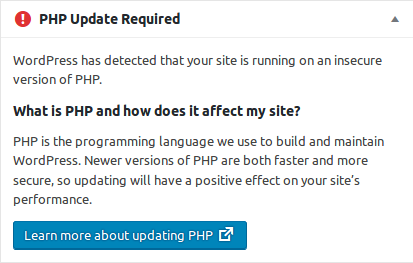
WordPress “PHP Update Required”

8 June 2019 09:26:11 +0000
Wordpress warning.

WordPress warning.

A number of clients have contacted us because they’ve noticed that WordPress is now displaying an ominous message on their dashboard that states, “WordPress has detected that your site is running on an insecure version of PHP.” This, unfortunately, is gratuitous, self-serving fearmongering (often referred to as “FUD“) on the part of WordPress the organisation. However, what is true is that version 5.2 of WordPress requires a higher version of PHP than our operating system vendor currently supplies. Therefore, providing the necessary version of PHP will require more work than just clicking a mythical “upgrade PHP” button somewhere, as some assume we just need to do.

Please be assured that we are alive to this issue, and are working to address it as soon as we can. However, it will likely take at least a couple of weeks.

Thank-you for your patience.


Update, 2021-06-28: The usual list of “requirements” that WordPress users look at is the one at wordpress.org/about/requirements, that helpfully includes an email you can send to your hosting company demanding … err … asking for certain versions of the necessary software. A more nuanced (and intelligent) version of this page is available at make.wordpress.org/hosting/handbook/server-environment. It contains far better language and explanations that mirror anything a thinking hosting company will tell you about the demands made by the WordPress organisation.

Entrusting your privacy to “the Cloud”

29 February 2012 23:59:52 +0000

As a company NinerNet is — and I personally am — a bucker of trends, a refuser of “the easy way”, an anti-“fashionista”, and an advocate of low-level simplicity. This can, at times, make us look like Luddites, but we’re not quite that bad. For example, we’ve joined the trend over the last few years of using the new electric light rather than burning torches to light the office.

The trend we haven’t joined is that of entrusting every scrap of data to “the Cloud”. And this is where what I call “low-level simplicity” comes in. Sure, it might be “easy” to set up a Gmail account, or to use Google Apps to host email on your company domain, or to use Blogger (also owned by Google) or WordPress.com to host your blog. It may even eventually be true, as one client told me recently, that websites are passé and have been replaced by Facebook! (Heaven help us if that prediction ever comes true!) But is it really easier?

In evaluating any course of action, one has to conduct a cost-benefit analysis. Even getting out of bed in the morning involves a cost-benefit analysis, so choosing where to store your private email and sensitive company documents certainly does too. But the costs and the benefits are not confined to the beginning of the endeavour; the costs and the benefits run the entire life of the course of action, from set-up to tear-down — whether or not that tear-down is voluntary and planned.

So if you want to entrust all of your data to the Cloud, please be my guest. Just remember to consider what might happen to that data once it’s beyond your control, how you might deal with the situation if the company you’ve entrusted it to loses it or disappears, what your losses will be if the company decides to give access to your data to someone (e.g., a government or someone undesirable who gains access to the data illegally or through a company takeover), and how you’re going to deal with the situation (and how much it’s going to cost) when you decide to switch systems. So it was free and easy to set up, but will it be free and easy to take down?

The paradigm shift, in my opinion, seems to have been the move from keeping all of your data locally and backing it up remotely (even if it involved driving back-up tapes to a warehouse across town), to keeping all of your data remotely and backing it up … where? Locally, or on another remote system, probably owned by the same company where your data is primarily stored? Good questions. Many of these systems (Cloud and otherwise) that are supposed to “help” you and make your life “easier” with respect to technology really just add a higher-level layer of complexity on top of lower-level simple protocols that have been running the Internet (just fine, thank-you very much) for decades.

Anyway, this is a long-winded introduction to Two honest Google employees: our products don’t protect your privacy. In that article security and privacy researcher Christopher Soghoian explodes the myth — if, in fact, the myth existed in the first place among people who actually think about this stuff — that Cloud companies like Google care one jot about the privacy of your data. In fact, Google’s business model — those ubiquitous adverts next to everything you see on the Web these days — relies on your data being open and easily read. Reading a steamy email from your husband about last weekend’s getaway? Yeah, the ads off to the side might also be NSFW.

Here’s a preview:

Google’s products do not meet the privacy needs of journalists, bloggers, small businesses (or anyone else concerned about government surveillance).

… if the files that I store in Google docs are encrypted or if the files I store on Amazon’s drives are encrypted then they are not able to monetize it …. And unfortunately, these companies are putting their desire to monetize your data over their desire to protect your communications. … their business model is in conflict with your privacy.

Read the comments too. Unlike on some blogs, these comments are intelligent and worth reading … with one exception. Oh, and Soghoian’s The New York Times article (When Secrets Aren’t Safe With Journalists), to which he refers, is worth reading too.

Don’t fool yourself. As with anything, use the right tool for the job, and be aware of the strengths, weaknesses, limitations, costs and overall suitability of the tool you choose.

Getting started with WordPress

30 April 2011 23:16:16 +0000

We’ve put up a page on our documentation website entitled Getting Started with WordPress, which is aimed at our clients that we have set up with the WordPress content management system. This is intended, as the title suggests, just to get you started — heading in the right direction — with WordPress, so that you’re not flailing about in the dark with nobody to hold your hand at the beginning. Once you’ve got the hang of things and learnt some of the lingo that WordPress uses, you can then strike out on your own, taking your blog or website where you want it to go, using WordPress to help you.

NinerNet home page

Subscriptions:

RSS icon. RSS

General Information:

This is the corporate blog of NinerNet Communications. It's where we post announcements, inform and educate our clients, and discuss issues related to the Internet (web and email) hosting business and all it entails. This includes concomitant industries and activities such as domain registration, SSL/TLS certificates, online back-up, virtual private servers (VPS), cloud hosting, etc. Please visit our main website for more information about us.

Search:


Recent Posts:

Archives:

Categories:

Tags:

accounts receivable apple billing branding cira contact information domain registration domain registry of canada domain renewals domains domain sales dot-ca domains dot-zm domains down time droc email encryption facebook google happy hosting customers hosting transfer icann invoices iphone kwacha maintenance paying your bill paying your invoice quarterly kwacha rate review rates registrar transfers reputation scams search engine optimisation search engine optimization security seo service hours spam ssl ssl/tls support transparency wordpress zamnet

Resources:

On NinerNet: